

Imagine you’re responsible for introducing Microsoft Fabric into an enterprise.
Your organization has customer records, financial information, operational data, and analytical workloads.
Business users need self-service analytics. Data engineers need access to notebooks and pipelines. Administrators need to manage the platform.
Some of that information is highly confidential.
You configure Microsoft Entra ID, require multifactor authentication, and assign workspace permissions.
Your environment is now secure, right?
Not necessarily.
The harder question is what happens when one of those protections fails:
- What happens if a legitimate user’s account is compromised?
- What if an employee with authorized access attempts to retrieve information outside their business responsibilities?
- What if compromised dependency runs inside an authorized notebook?
- What if someone exports information they were legitimately allowed to view?
And what happens when the threat doesn’t start at the front door? Each situation begins in a different place. Each asks something different from the architecture.
If one part of the security architecture fails, what still prevents the threat from reaching data?
This is where Defense in Depth becomes an architectural principle rather than a collection of security settings.
Defense in depth means designing additional controls that limits damage or so called blast radius when an identity, workload or protection in earlier trust boundaries is compromised.
1. From threat modelling to Defense in Depth
The scenarios that follow use threat modelling to connect valuable assets and business requirements to potential threats.
STRIDE(Spoofing, Tampering, Repudiation, Information disclosure, Denial of service, Elevation of privilege) method can help identify different threat types, while examining attack paths shows how those threats could affect the environment.
Defense in Depth guides how we combine controls to prevent incidents, detect suspicious activity and limit damage. We examine what protection remains if a control fails or the threat starts beyond it.
The reasoning follows a consistent structure:
Assets and requirements → threat scenario and attack path → layered controls → validation →
residual risk → risk decision.
Each control has a purpose, assumptions and limitations. We also examine shared dependencies that could undermine several layers at once
Validation checks whether controls behave as expected. They can reduce the likelihood or impact of a threat, while some exposure may remain. That residual risk needs assessment and an explicit decision.
| Risk Decision | Architectural response |
|---|---|
| Mitigate | Add controls, change the design or narrow the capability’s users, permissions and data scope. |
| Avoid | Withhold or disable the capability for the affected activity or use case. |
| Accept | An authorized risk owner documents acceptance, including conditions and review arrangements. |
Defense in Depth supports risk reduction. The risk decision determines whether the remaining exposure is tolerable for the intended use.
The scenarios illustrate the approach rather than provide a complete STRIDE assessment. Their tables identify residual exposure; assessing its likelihood and impact requires the actual environment and validation evidence.
Note: Fabric’s capabilities will evolve, and these scenarios are conceptual. The systematic approach of identifying threats, selecting and validating controls, and assessing residual risk remains relevant as the platform changes.
2. Why the perimeter is only part of the architecture
Consider a medieval castle.
Its walls protect against external attackers and restrict entry. Its gates control who can enter and guards protect important buildings, and valuable assets are stored in secured rooms with their own access rules.
Those protection serve different purposes, meaning passing through the gate should not give the visitor keys to every room.
The same principle applies to enterprise data platforms.
A network boundary can restrict where a connection originates. Authentication and authorization establishes identity and determine what it can do. Information protection addresses what happens with data that is classified, copied or shared.
Microsoft provides security controls across identity, network access, tenant administration, workspaces, individual items, and data. These controls serve different purposes and must be designed together.
The design needs more than a sequence of walls. It needs control to remain useful from different starting points, and understanding of which controls could fail together.
3. Understanding the security boundaries in Microsoft Fabric
Before selecting individual settings, I would map the assets, the people and workloads that need them, and the places where trust changes.
For Fabric platform, seven control areas provide a useful starting point.
-
Identity
Entra ID, MFA, Conditional Access
-
Tenant governance
Settings, delegated administration, policy
-
Inbound network
Private connectivity and public-access policy
-
Workspace and items
Roles, item permissions, workload separation
-
Compute and outbound
Runtime identity, dependencies, destinations
-
Data authorization
Table, row and column access by reading path
-
Information protection
Labels, supported protection, sharing, DLP
Monitoring
& Response
- Audit
- Detection
- Access review
- Investigation
- Containment
- Evidence
Workspace roles and item permissions govern management and access to items. OneLake security provides granular data access within supported items.
A narrow data role does not remove broader access granted elsewhere.
Workspace Admins, Members and Contributors already have broad data privileges; OneLake security roles do not restrict those privileges.
The workspace structure itself becomes a security decision.
Private connectivity also needs a defined scope. Fabric supports tenant-level and workspace-level Private Link, with item-specific restrictions. A private endpoint and a policy denying public access are separate configuration decisions. Confirm supported items and access paths before drawing a private boundary around a workload
With those boundaries in mind, we can examine the threats that make them necessary.
4. Threat scenario: A compromised user account
Imagine a financial analyst named Alex.
Alex legitimately needs access to sales reports. Their account has permission to view a Power BI report, but they have no business reason to access raw customer identifiers or HR records.
An attacker hijacks Alex’s authenticated session and begins exploring the environment using the permissions Alex already has.
At this point, authentication alone cannot provide the separation we need. The attacker is exercising a valid identity’s access.
The attack path now follows legitimate access.
The key question is not only how we prevent an account from being compromised.
What limits the attacker after sign-in has already succeeded?
How much damage that account could cause if it were compromised?
The goal is not to assume that an authenticated identity is trustworthy forever. Instead, the design should minimize the consequences of that identity being misused.
| Risk | Controls | Residual risk |
|---|---|---|
| The stolen session reaches unrelated confidential data. | Narrow workspace, item and data grants, separate reporting from confidential source access. | Broad or overlooked grants can still expand the attacker’s reach. |
| The attacker misuses information Alex is allowed to read. | Minimize sensitive report detail; apply supported export controls and monitoring. | Information within Alex’s permitted scope remains exposed to misuse. |
Validate: Test Alex’s effective access through each available reading path. Approved reporting should work; unrelated confidential data should be denied.
Risk decision: Reduce detail or separate sensitive outputs if the permitted reader exposure remains too high. Acceptance must cover the sensitivity and scope of that access.
In this scenario, least-privilege permissions should prevent Alex’s identity from automatically gaining access to unrelated workspaces or sensitive datasets. Network and session restrictions may introduce additional barriers, depending on how the compromise occurs and which controls are configured. Monitoring should help the security team investigate unusual activity.
If a reporting account can browse unrelated confidential workspaces, the problem existed before the attacker arrived.
5. Threat scenario: An insider requests confidential data
Not every threat originates outside the organization.
Consider an employee who needs access to customer information for a legitimate investigation. The employee currently has access to aggregated reports but not the underlying confidential records.
They request additional permissions.
| Risk | Controls | Residual risk |
|---|---|---|
| An approved request gives more access than the task requires. | Record purpose, owner and duration; approve and assign narrowly scoped permissions. | The employee can still misuse information within the approved scope. |
| Access continues after the investigation ends. | Time-bound assignments, access reviews and verification after expiry. | Other grants, active sessions or retained copies may survive assignment removal. |
Validate: Confirm the approved data is accessible, unrelated data is denied, and access ends after expiry. Check alternative grants and retained copies separately. For example, a business analyst who needs three columns from a customer table should not automatically receive Contributor access to an entire workspace.
Risk decision: If suitably narrow access cannot be provided, offer a controlled, minimized output or withhold elevated access. The authorized risk owner decides whether the remaining exposure is acceptable.
For confidential data, define both how access is approved and how it ends.
Example approval process:
- Request: Employee specifies the required data, business purpose and duration.
- Approval: The designated manager or data owner reviews the business justification.
- Provisioning: Approved access is assigned to the appropriate group or resource with the least privileged permission.
- Review and expiration: Access is reviewed and removed when no longer required.
Microsoft Entra ID Governance provides access packages that can support approval-based access requests and periodic reviews.
OneLake security can grant more granular access to supported data items, including restrictions at table, row and column levels.
An approved request establishes a decision. The permissions and their lifecycle make that decision effective.
6. Threat scenario: Malicious code runs inside a notebook
Another starting point; an attacker does not compromise an employee’s browser session. Instead, a Spark notebook uses a third-party library to transform customer data. Assume that dependency contains malicious code. When the notebook runs, the code reads customer records using the workload’s existing permissions and attempts to send a copy to an unapproved external destination.
The threat now originates inside an authorized compute workload. Restricting how clients enter Fabric does not address the connections that this code can initiate. We need to examine what the code can access and where it can connect.
| Risk | Controls | Residual risk |
|---|---|---|
| A malicious dependency reaches production. | Dependency review and controlled notebook releases. | Review can miss harmful code. |
| Code reads or modifies sensitive data. | Narrow runtime identity and data permissions. | Permitted reads and writes remain available to the code. |
| Data is sent to an external destination. | Outbound access protection with approved managed private endpoints. | An approved destination may still be misused. |
| Harmful activity continues unnoticed. | Configured monitoring, investigation and workload containment. | Detection gaps or delays can allow damage before response. |
For supported Data Engineering items, enabling workspace outbound access protection blocks outbound connections by default. Approved destinations can be allowed through managed private endpoints.
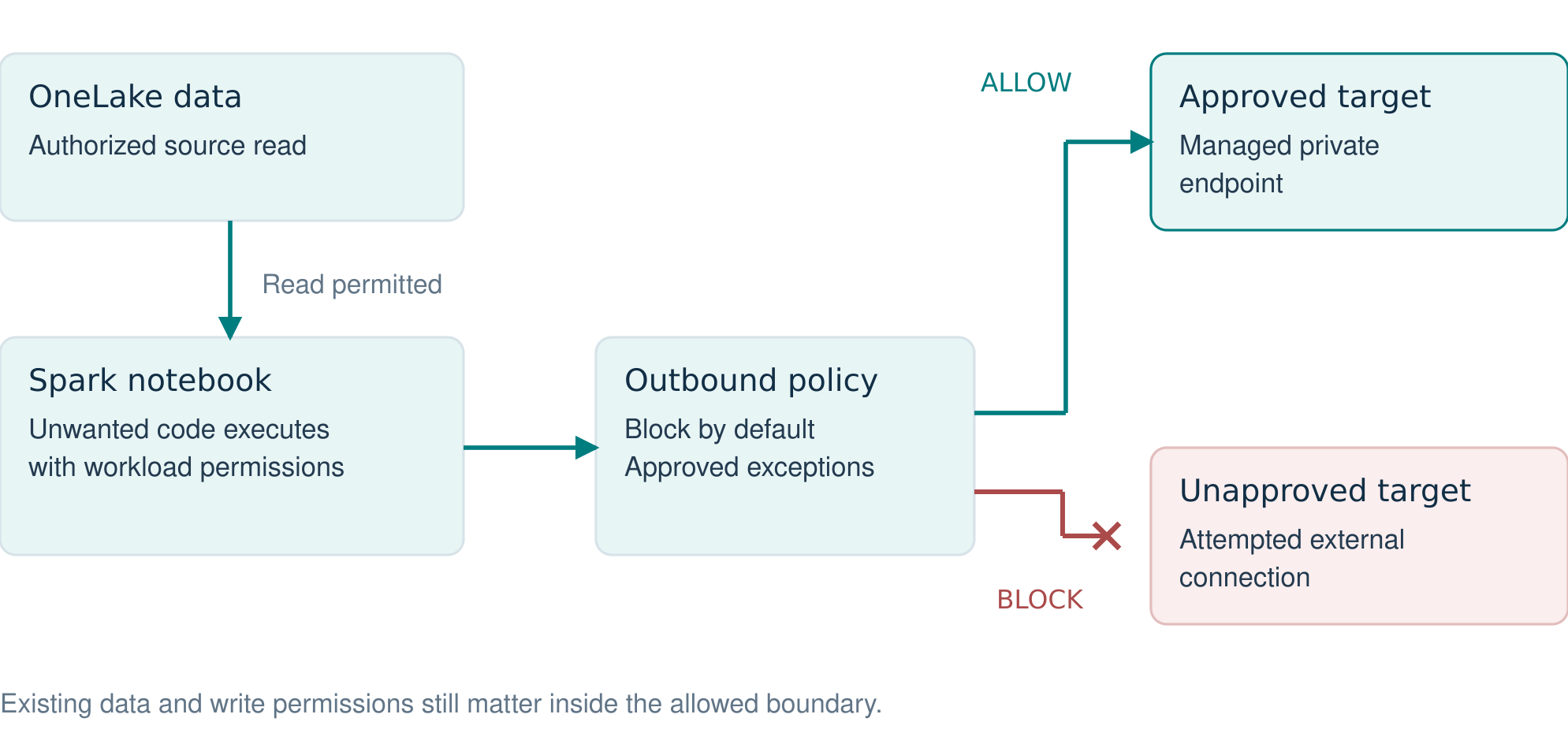
That is a useful security boundary, but the customer records may already have been read.
The code can still access data its execution identity is authorized to read, modify data through existing write permissions, or misuse an approved destination. Blocking one outbound path limits part of the attack; the remaining permissions still determine what damage is possible.
Public package downloads may no longer work with this control; approved packages or a supported private source need to be available. Security choices must be reflected in the delivery process so teams can operate within them.
Validate: Using synthetic data, confirm approved connectivity succeeds and an unapproved connection fails. Check effective read and write permissions separately.
Risk decision: Narrow workload access or withhold confidential processing if exposure remains unacceptable. Defense in Depth requires other controls to constrain compromised code.
7. Threat scenario: Data escapes through legitimate sharing
Imagine that every previous control works as intended.
An employee signs in successfully, accesses a report they are authorized to view, and exports information. That information is then shared outside the organization.
The access was legitimate. The destination might not be.
This is where data protection becomes more important than simply securing the original workspace.
| Risk | Controls | Residual risk |
|---|---|---|
| A report releases more detail than needed. | Minimize sensitive detail; restrict supported export and sharing routes. | Permitted information can still be copied or disclosed. |
| An exported file reaches an unauthorized reader. | Configure label-associated file protection on supported Power BI export paths. | Unsupported formats and manual disclosure remain exposure paths. |
| Sensitive items are insufficiently governed inside Fabric. | Use supported protection policies and Purview DLP matches and actions. | Item restrictions do not automatically protect every copy. |
| Disclosure is discovered too late. | Use supported audit evidence, configured alerts and incident response. | Evidence and detection may not cover subsequent external sharing. |
Microsoft Fabric integrates with Microsoft Purview sensitivity labels and information-protection capabilities. Labels can help classify information and, in supported scenarios, carry protection into exported files.
A classification label alone does not guarantee restricted file access. Protection must be configured; CSV and TXT exports do not carry the same label-associated protection.
The in-service controls have their own scope. Fabric protection policies exclude reports and dashboards. DLP evaluates supported items, rather than every exported file or forwarding event; its restrict-access action is documented as Preview(as of October 2026)
Validate: Test actual formats and routes with synthetic data. An approved recipient should open a protected file; an unauthorized recipient should be denied.
Risk decision: Reduce detail and export routes where necessary. A person can still photograph or retype allowed information; acceptance must address the intended audience and data sensitivity.
The architecture must account for how information is accessed, copied, exported and shared. A secure Lakehouse is not sufficient if its confidential information can be reproduced without appropriate controls elsewhere.
8. Turning these scenarios into an enterprise security architecture
We now have several starting points: a compromised account, a legitimate access request, malicious workload code and a legitimate export.
These scenarios do not follow the same path. That is precisely why security architecture should begin with threat scenarios rather than a list of available product features.
The controls matter because they address different parts of those situations.
| Starting point | Controls to evaluate | Exposure that can remain |
|---|---|---|
| Compromised analyst | Limited item and data access; appropriate session and network policy. | Information the identity is already allowed to read. |
| Sensitive access request | Data-owner approval; narrow, time-limited grants; access review. | Other grants or copies that survive removal. |
| Malicious notebook code | Runtime permissions; dependency controls; outbound protection. | Authorized data, writes and approved destinations. |
| Unsafe export or sharing | Minimized outputs; supported information protection; sharing controls. | Unsupported paths and deliberate human disclosure. |
The matrix is a reasoning aid, not a claim that a control prevents every instance of the threat.
Negative testing is particularly important. It is not enough to demonstrate that an authorized user can read a dataset. We also need to demonstrate that an unauthorized user cannot. The same applies to network restrictions, workspace boundaries and data-sharing policies.
Review the administrators who can change membership, code, network policy and evidence collection. Several controls can share a failure mode when the same compromised identity can alter them all.
Assign responsibility for each boundary and define who investigates when it fails. Monitoring and response need to span the architecture, with evidence that can be correlated across identities, items and operations.
Validation informs the risk assessment; it does not establish the absence of every possible threat.
9. Assess the remaining risk and decide
The scenario tables describe exposure that can remain, not a completed risk assessment. Use the actual implementation and validation evidence to assess its likelihood and impact for the affected assets and business use.
Record the risk owner, affected assets and capability, implemented controls, evidence, remaining likelihood and impact, and the decision. The response may be further reduction, avoidance of the activity, or documented acceptance by the authorized owner. Acceptance should state its conditions and review arrangements
Revisit the assessment after material changes to data sensitivity, identities, code, connectivity, publishing or control support. Continuing to use a capability should remain consistent with the approved conditions.
Conclusion: Design for what happens after a control fails
Securing Microsoft Fabric is not about building the largest possible wall around a cloud service. It is about understanding what happens when individual protections fail.
- A compromised account should encounter authorization boundaries.
- A compromised Spark workload should not have unrestricted outbound connectivity.
- A user with access to aggregated reports should not automatically gain access to confidential source data.
- Sensitive information should remain governed even after it leaves its original analytical environment.
Every security control has a purpose. Every control has limitations. Important to understand both.
Defense in Depth is not about assuming that attackers will always start outside the castle.
It is about ensuring that wherever a threat begins, the rest of the architecture still has a role to play.
Final words
It is easy to see the business value of many products. The harder question is whether they can meet the requirements for protecting an organization’s data assets. Regulatory obligations, particularly in Europe, add to that challenge.
A checklist of security features can be a useful starting point. Building a secure architecture requires a more systematic approach: understanding the threats, selecting appropriate controls, validating their effectiveness and being transparent about the risks that remain.
Ultimately, the decision comes down to balancing business value against residual risk.
If you enjoyed this article, subscribe so you don’t miss the next one!
References
- Security in Microsoft Fabric
- Data security in OneLake
- Private links for secure access to Fabric
- Supported scenarios for workspace-level private links
- Read data secured with OneLake security
- Microsoft Entra entitlement management
- Workspace outbound access protection for Data Engineering
- Fabric workspace identity
- Information protection in Fabric
- Protection policies in Fabric
- DLP for Fabric and Power BI
- Security feature availability in Microsoft Fabric
- OWASP: Threat Modeling
- Microsoft Threat Modeling Tool: STRIDE
- NIST: Defense-in-depth
- NIST: Risk response
- NIST: Residual risk
- Export and sharing tenant settings
- Fabric audit operation list